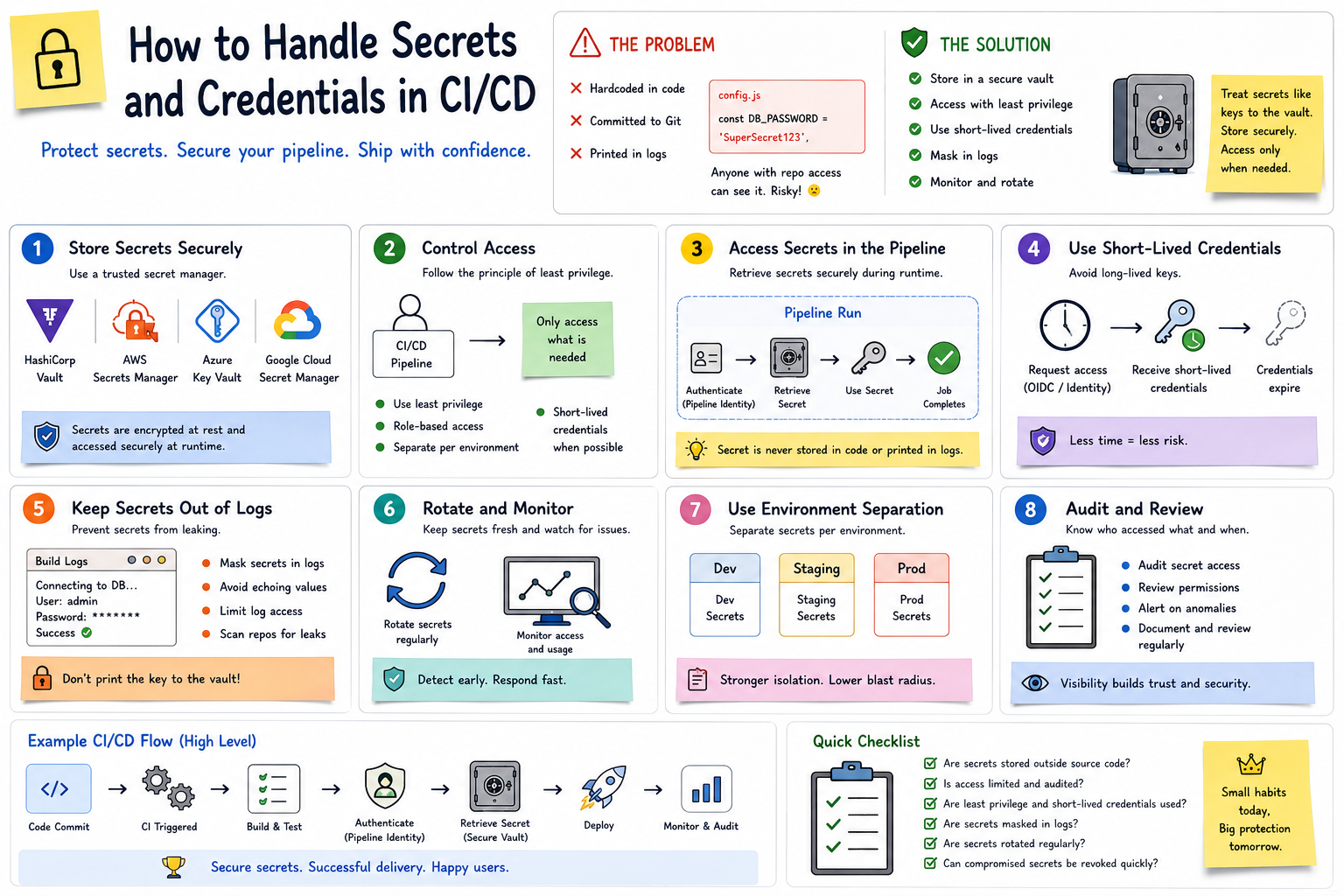
🔐 How to Handle Secrets and Credentials in CI/CD Part 3
👀 🔟 Monitor Secret Access
A bank doesn’t just lock its vault.
It also records:
👤 Who accessed it
🕐 When they accessed it
🔑 What they accessed
CI/CD environments should provide similar visibility.
Monitor:
📊 Authentication attempts
📊 Secret access
📊 Permission changes
📊 Unusual pipeline activity
📊 Failed access attempts
If a credential is used unexpectedly, your team should be able to investigate quickly.
🔄 A Secure CI/CD Flow
A safer pipeline might look like:
👨💻 Developer Pushes Code
⬇️
⚙️ CI Pipeline Starts
⬇️
🧪 Build & Test
⬇️
🔐 Pipeline Authenticates
⬇️
🏦 Secret Retrieved Securely
⬇️
🚀 Application Deployed
⬇️
⏳ Temporary Credential Expires
⬇️
📊 Access Is Logged & Monitored
Notice what’s missing?
🚫 Secrets stored directly in the source code.
🛡️ Secrets Management Checklist
Before calling your pipeline secure, ask:
✅ Are secrets stored outside source code?
✅ Are sensitive values masked in logs?
✅ Are permissions based on least privilege?
✅ Are production secrets separated from development secrets?
✅ Are credentials rotated appropriately?
✅ Can compromised credentials be revoked quickly?
✅ Are secret-access events monitored?
🎯 The Bottom Line
Managing secrets in CI/CD is like protecting the keys to a bank vault.
You don’t leave them lying around.
You:
🏦 Store them securely
👤 Control who can access them
⏳ Limit how long access lasts
🔄 Rotate them when necessary
🧾 Prevent them from appearing in logs
👀 Monitor how they’re being used
Your CI/CD pipeline may be highly automated, but automation without secure credential management can create serious risk.
Because in DevOps…
🔐 Automate the deployment—not the exposure of your secrets.
💬 How does your team manage secrets in CI/CD—platform secrets, HashiCorp Vault, cloud secret managers, or another approach? 👇
🐙 1️⃣1️⃣ A Concrete GitHub Actions Example
Let’s put this into practice.
Imagine your GitHub Actions pipeline needs to build a Docker image and push it to a container registry.
The pipeline needs credentials—but you don’t want those credentials inside your repository.
🏦 Think of GitHub Actions as the bank employee who needs temporary access to the vault.
The employee should be able to retrieve what they need without seeing the master key written on their desk.
🔐 Step 1: Store the Credentials as GitHub Secrets
Instead of putting credentials inside your workflow file, store them in:
Repository → Settings → Secrets and variables → Actions
For example:
🔑 REGISTRY_USERNAME
🔐 REGISTRY_PASSWORD
Your repository contains the reference to the secret, not the actual credential.
To be contd. »>Part 4