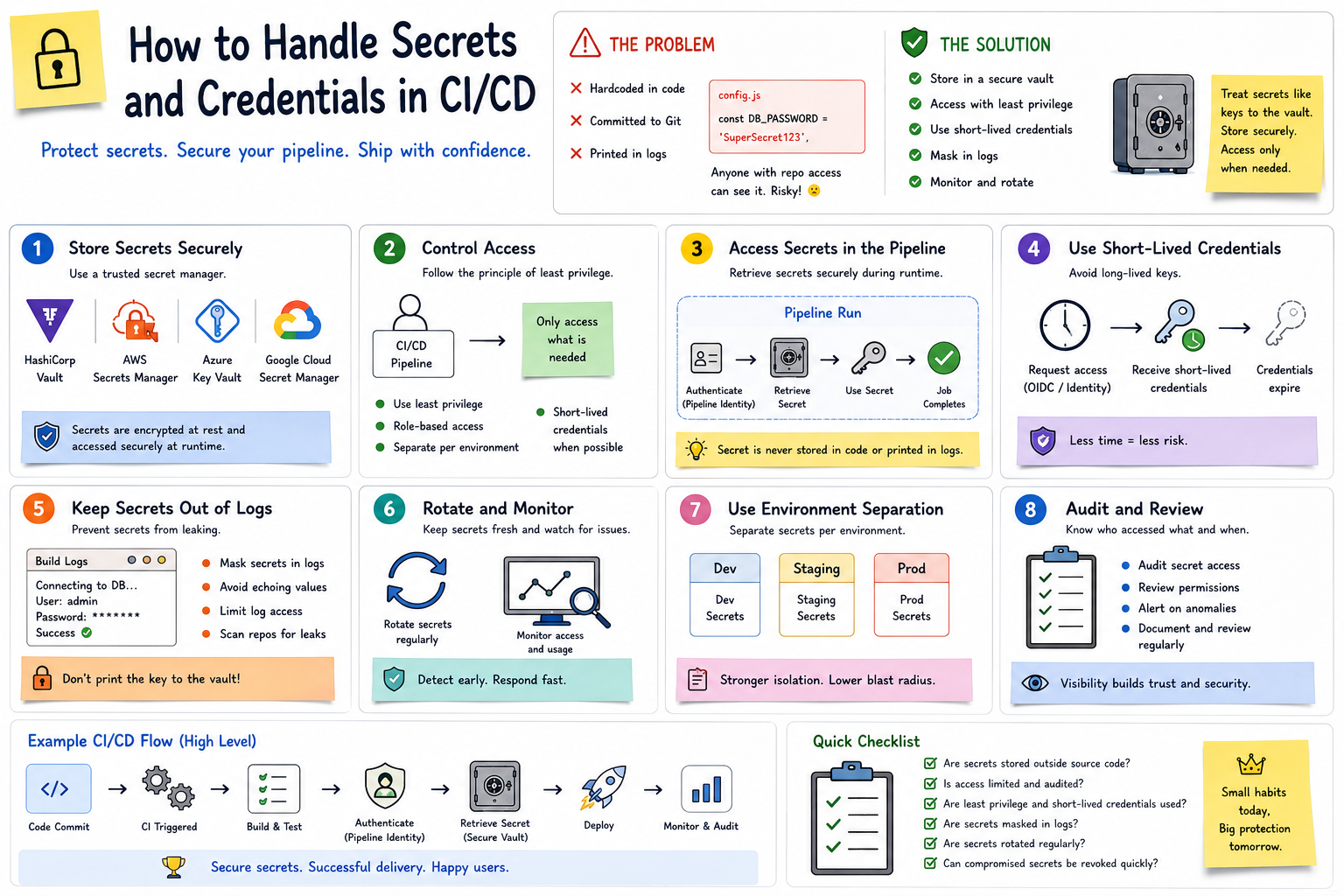
🔐 How to Handle Secrets and Credentials in CI/CD Part 3
👀 🔟 Monitor Secret Access
A bank doesn’t just lock its vault.
It also records:
👤 Who accessed it
🕐 When they accessed it
🔑 What they accessed
CI/CD environments should provide similar visibility.
Monitor:
📊 Authentication attempts
📊 Secret access
📊 Permission changes
📊 Unusual pipeline activity
📊 Failed access attempts
If a credential is used unexpectedly, your team should be able to investigate quickly.
🔄 A Secure CI/CD Flow
A safer pipeline might look like:
👨💻 Developer Pushes Code
⬇️
⚙️ CI Pipeline Starts
⬇️
🧪 Build & Test
⬇️
🔐 Pipeline Authenticates
⬇️
🏦 Secret Retrieved Securely
⬇️
🚀 Application Deployed
⬇️
⏳ Temporary Credential Expires
⬇️
📊 Access Is Logged & Monitored
Notice what’s missing?
🚫 Secrets stored directly in the source code.
🛡️ Secrets Management Checklist
Before calling your pipeline secure, ask:
✅ Are secrets stored outside source code?
✅ Are sensitive values masked in logs?
✅ Are permissions based on least privilege?
✅ Are production secrets separated from development secrets?
✅ Are credentials rotated appropriately?
✅ Can compromised credentials be revoked quickly?
✅ Are secret-access events monitored?
🎯 The Bottom Line
Managing secrets in CI/CD is like protecting the keys to a bank vault.
You don’t leave them lying around.
You:
🏦 Store them securely
👤 Control who can access them
⏳ Limit how long access lasts
🔄 Rotate them when necessary
🧾 Prevent them from appearing in logs
👀 Monitor how they’re being used
Your CI/CD pipeline may be highly automated, but automation without secure credential management can create serious risk.
Because in DevOps…
🔐 Automate the deployment—not the exposure of your secrets.
💬 How does your team manage secrets in CI/CD—platform secrets, HashiCorp Vault, cloud secret managers, or another approach? 👇
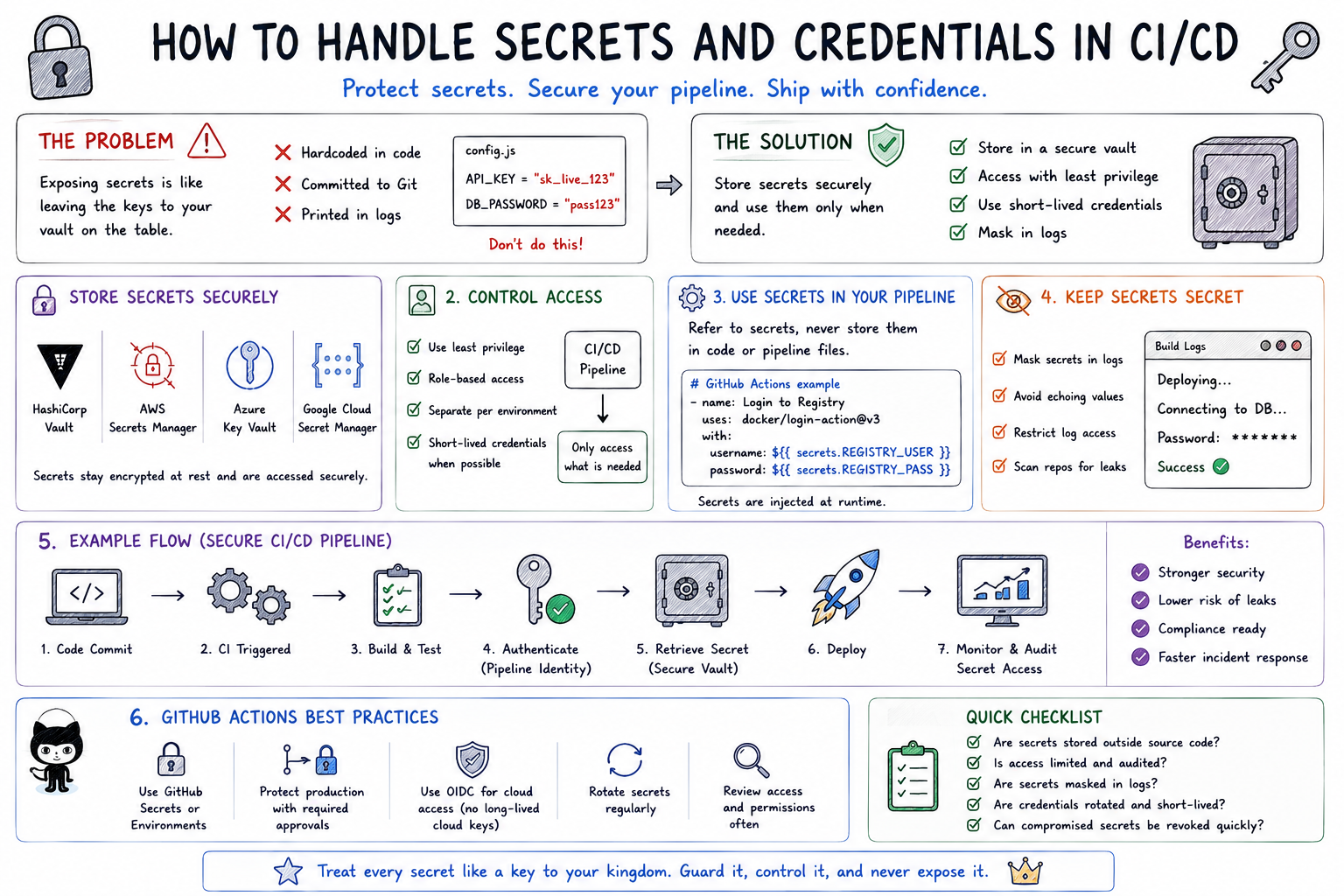
🐙 1️⃣1️⃣ A Concrete GitHub Actions Example
Let’s put this into practice.
Imagine your GitHub Actions pipeline needs to build a Docker image and push it to a container registry.
The pipeline needs credentials—but you don’t want those credentials inside your repository.
🏦 Think of GitHub Actions as the bank employee who needs temporary access to the vault.
The employee should be able to retrieve what they need without seeing the master key written on their desk.
🔐 Step 1: Store the Credentials as GitHub Secrets
Instead of putting credentials inside your workflow file, store them in:
Repository → Settings → Secrets and variables → Actions
For example:
🔑 REGISTRY_USERNAME
🔐 REGISTRY_PASSWORD
Your repository contains the reference to the secret, not the actual credential.
To be contd. »>Part 4
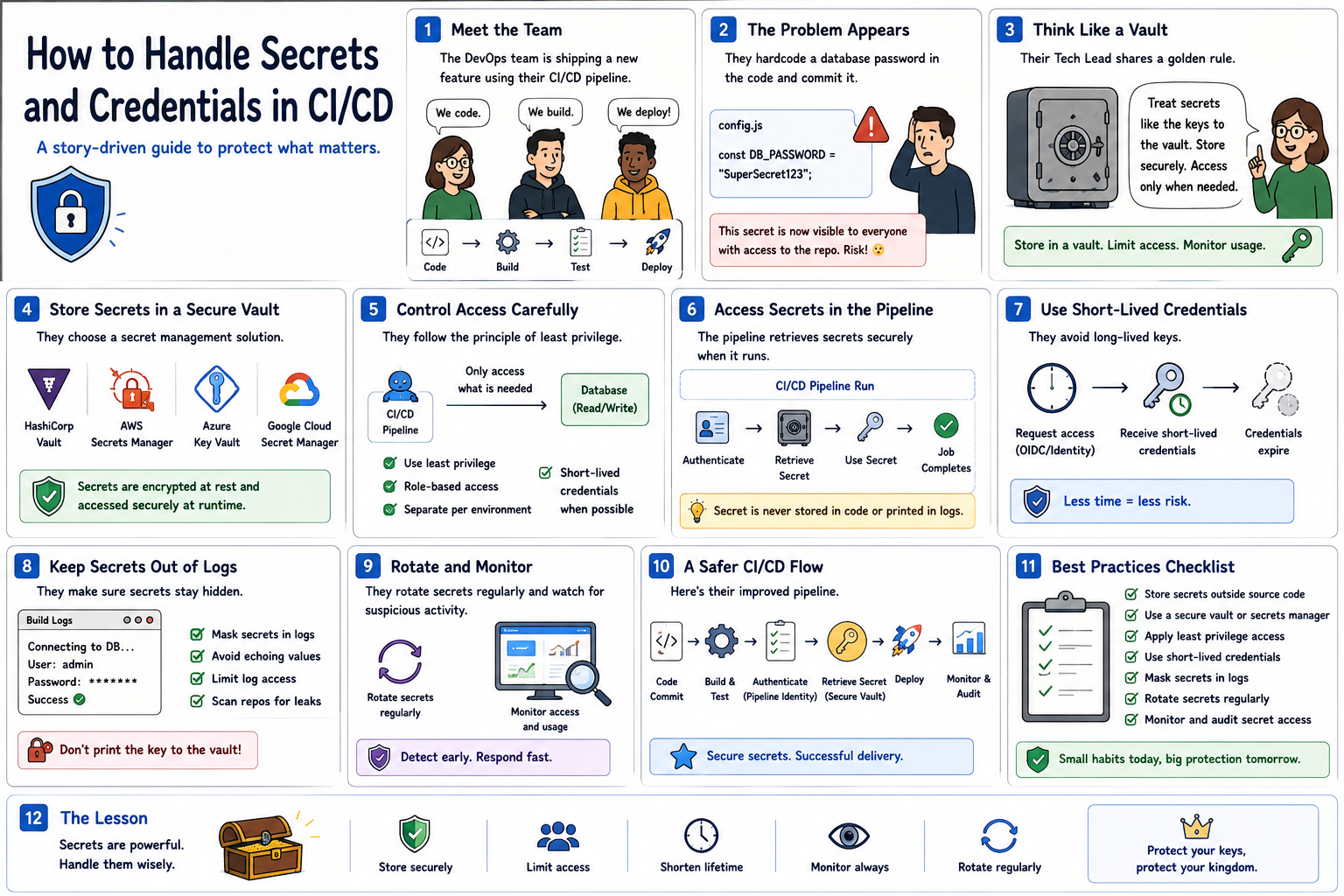
🔐 How to Handle Secrets and Credentials in CI/CD Part 2
👤 5️⃣ Follow the Principle of Least Privilege
Imagine giving every bank employee the master key to every vault.
That would be unnecessary—and dangerous.
The same principle applies to CI/CD.
A pipeline should receive only the permissions required to perform its task.
For example:
If a deployment pipeline only needs permission to deploy one application…
Don’t give it administrator access to your entire cloud environment.
Use:
✅ Role-Based Access Control
✅ Limited service accounts
✅ Environment-specific permissions
✅ Short-lived credentials where possible
🎯 Give pipelines what they need—not everything they could possibly access.
⏳ 6️⃣ Prefer Short-Lived Credentials
Imagine a bank access card that automatically expires after one hour.
Even if someone steals it, its usefulness is limited.
Modern CI/CD systems can use temporary credentials instead of permanent passwords.
For example:
Pipeline starts
⬇️
🔐 Authentication occurs
⬇️
🎟️ Temporary credential issued
⬇️
🚀 Deployment happens
⬇️
⏳ Credential expires
This reduces the risk associated with long-lived credentials.
🔄 7️⃣ Rotate Secrets Regularly
Imagine using the same vault combination for ten years.
The longer it exists, the greater the opportunity for it to be compromised.
Secrets should be rotated when appropriate.
That includes:
🔑 API keys
🔐 Passwords
🎟️ Tokens
📜 Certificates
Automation can make rotation easier and reduce manual mistakes.
And if a credential is suspected of being exposed?
🚨 Revoke and replace it immediately.
🧾 8️⃣ Keep Secrets Out of Logs
There’s another common problem.
Your secret may be stored securely…
But your pipeline accidentally prints it into the build logs.
😬 Now anyone with access to those logs may be able to see it.
CI/CD systems should:
✅ Mask sensitive variables
✅ Avoid printing environment variables unnecessarily
✅ Restrict access to pipeline logs
✅ Prevent debugging commands from exposing credentials
💡 Protecting the vault is useless if you accidentally print the combination on the receipt.
☸️ 9️⃣ What About Kubernetes?
Suppose your CI/CD pipeline deploys an application to Kubernetes.
The application needs a database password.
Instead of embedding the password inside the container image:
🐳 Docker builds the application image.
⬇️
🚀 CI/CD deploys it.
⬇️
☸️ Kubernetes provides the required secret to the workload.
Kubernetes provides a Secret resource for holding sensitive configuration separately from application code.
For stronger security requirements, Kubernetes can also integrate with external secret-management systems.
The important idea is:
🎯 Keep application code, container images, and sensitive credentials separate.
To be contd. »>Part 3
🔐 How to Handle Secrets and Credentials in CI/CD
Ever wondered where passwords, API keys, tokens, and cloud credentials should live in a CI/CD pipeline?
One thing is certain:
🚫 They should not live inside your source code.
Here’s a simple way to understand secrets management:
🏦 Think of your CI/CD pipeline like a bank.
The pipeline moves valuable assets from one place to another.
But you wouldn’t leave the keys to the bank vault sitting on the reception desk.
You protect them, control who can access them, and monitor when they’re used.
That’s exactly how CI/CD secrets should be handled.
🔑 1️⃣ Secrets Are the Keys to the Vault
Applications often need sensitive information to communicate with other systems.
These may include:
🔑 API keys
🔐 Database passwords
🎟️ Access tokens
☁️ Cloud credentials
📜 Certificates and private keys
These credentials can unlock critical systems.
If attackers obtain them, they may gain access to applications, infrastructure, databases, or cloud resources.
That’s why secrets should be treated like keys to your organization’s vault.
🚫 2️⃣ Never Store Secrets in Source Code
Imagine writing your bank vault combination on a piece of paper and pinning it to the office noticeboard.
That’s essentially what happens when credentials are hardcoded into application code.
For example:
DATABASE_PASSWORD = “MySecretPassword123”
Once committed to Git, the secret may remain in the repository’s history even if the line is later removed.
Instead:
❌ Don’t hardcode credentials.
❌ Don’t commit .env files containing real secrets.
❌ Don’t place passwords directly inside pipeline configuration.
✅ Retrieve secrets securely when the pipeline needs them.
🏦 3️⃣ Use a Secure Secrets Vault
Banks don’t leave valuable assets lying around.
They put them inside a vault.
CI/CD pipelines should do the same.
Secrets can be stored using dedicated secret-management systems such as:
🔐 HashiCorp Vault
☁️ AWS Secrets Manager
🔑 Azure Key Vault
☁️ Google Cloud Secret Manager
These systems allow applications and pipelines to retrieve credentials securely when needed.
💡 The secret stays in the vault until an authorized process requests it.
⚙️ 4️⃣ Use Your CI/CD Platform’s Secret Management
Modern CI/CD platforms also provide mechanisms for storing sensitive values.
For example:
🐙 GitHub Actions → GitHub Secrets
🦊 GitLab CI/CD → CI/CD Variables
⚙️ Jenkins → Credentials
Instead of writing a password directly into your pipeline, you reference the stored secret.
The pipeline knows where to retrieve it without exposing the actual value in your source code.
To be contd. »>Part 2
📊 Monitoring and Rollback Strategies in CI/CD Part 2
🔄 5️⃣ Rollback Is the Emergency Return Plan
Now imagine an aircraft develops a serious technical problem shortly after takeoff. The pilot doesn’t continue simply because the flight already departed.
There must be a safe way back. That’s what a rollback strategy provides.
If a deployment introduces serious problems, teams can return the application to a previously known-good version.
Instead of spending hours repairing production while customers are affected:
🚨 Problem detected
⬇️
🔄 Rollback initiated
⬇️
✅ Previous stable version restored
🟦🟩 6️⃣ Blue-Green Deployment Reduces Rollback Risk
Imagine an airline preparing a replacement aircraft before taking the existing one out of service. That’s similar to blue-green deployment.
You maintain two environments:
🔵 Blue — Current production version
🟢 Green — New version
Traffic moves to Green after validation. If something goes wrong?
↩️ Traffic can be redirected back to Blue.
This makes recovery much faster than rebuilding the previous environment from scratch.
🐤 7️⃣ Canary Releases Limit the Blast Radius
Airlines don’t always introduce major operational changes across their entire fleet at once. They may test them with a smaller group first. A canary deployment follows the same principle.
Instead of sending 100% of users to the new release:
➡️ Start with 5%
📊 Monitor the results
➡️ Increase to 25%
📊 Monitor again
➡️ Gradually move toward 100%
If problems appear early, only a small percentage of users are affected.
🎯 Small exposure. Fast feedback. Lower risk.
🔁 8️⃣ Monitoring Completes the CI/CD Feedback Loop
A CI/CD pipeline shouldn’t end with:
Build → Test → Deploy
A mature pipeline looks more like:
👨💻 Code
➡️ ⚙️ Build
➡️ 🧪 Test
➡️ 🚀 Deploy
➡️ 📡 Monitor
➡️ 📊 Analyze
➡️ 🔄 Rollback or Improve
➡️ 👨💻 Feed insights back into development
Monitoring tells you whether the release is actually working in the real world.
🚀 Why Monitoring and Rollback Matter
Together, they help teams achieve:
⚡ Faster incident detection
🛡️ Lower deployment risk
🔄 Faster recovery
📉 Reduced downtime
📊 Better production visibility
😊 More reliable customer experiences
🎯 The Bottom Line
Deploying software without monitoring is like flying an aircraft without radar.
Deploying without a rollback strategy is like flying without an emergency plan.
A strong CI/CD process doesn’t simply ask:
🚀 “Did the deployment succeed?”
It also asks:
📊 “Is the application healthy?”
👥 “Are users experiencing problems?”
🔄 “Can we recover quickly if something goes wrong?”
Because in modern DevOps, the goal isn’t simply to deploy faster.
It’s to deploy confidently, observe continuously, and recover quickly. 🚀
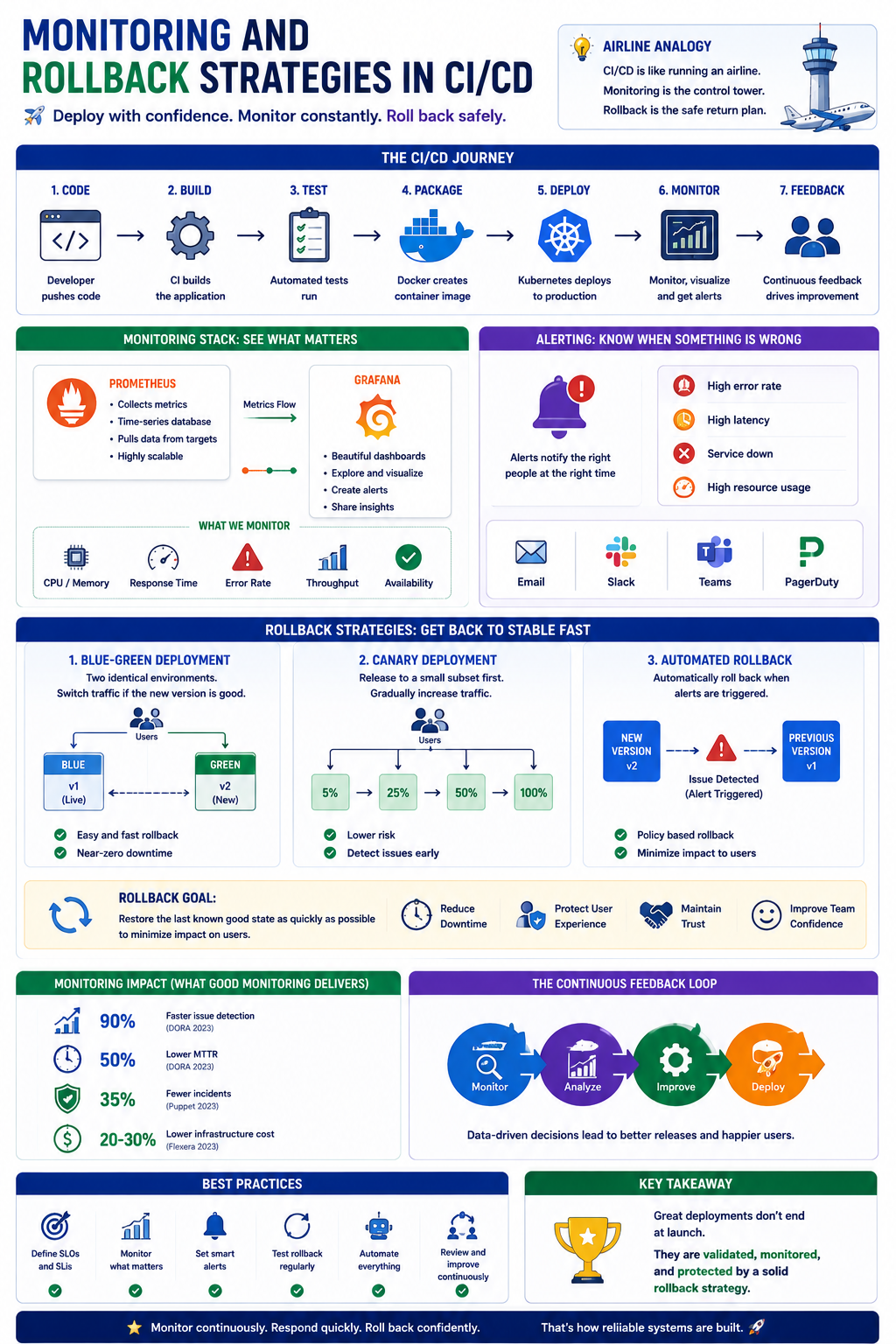
📊 Monitoring and Rollback Strategies in CI/CD
Ever deployed an application successfully only to discover something went wrong after it reached production?
You’re not alone. A successful deployment doesn’t always mean a successful release.
Here’s a simple way to understand why monitoring and rollback strategies matter:
✈️ Think of CI/CD like operating a modern airline.
Getting the aircraft into the air is important. But the job doesn’t end at takeoff. You still need to monitor the flight—and have a safe plan if something goes wrong.
📡 1️⃣ Monitoring Is the Air Traffic Control Center
Once an aircraft takes off, air traffic controllers continuously watch:
📍 Location
⏱️ Speed
🌦️ Conditions
⚠️ Potential problems
Applications need the same visibility after deployment.
Monitoring tools continuously track:
✅ Application health
✅ CPU and memory usage
✅ Response times
✅ Error rates
✅ Traffic patterns
Without monitoring, your application could be experiencing problems while your team remains unaware.
📊 2️⃣ Prometheus Collects the Signals
Imagine hundreds of aircraft transmitting information back to the control center. Someone needs to collect all those signals. That’s similar to what Prometheus does.
Prometheus collects metrics from applications and infrastructure, helping teams understand what’s happening across their systems.
💡 Think of Prometheus as the radar system collecting operational data.
📈 3️⃣ Grafana Turns Data Into Visibility
Collecting thousands of metrics isn’t enough. Engineers need to understand them quickly. That’s where Grafana comes in.
Grafana turns monitoring data into dashboards and visualizations.
Teams can quickly see:
📈 Traffic increases
🔥 CPU spikes
🐌 Slow response times
❌ Rising error rates
💡 Prometheus collects the signals. Grafana helps engineers see what those signals mean.
🚨 4️⃣ Alerts Tell You When Something Is Wrong
Air traffic controllers don’t stare at every aircraft every second waiting for something unusual. Systems alert them when attention is required.
CI/CD environments should work the same way.
Alerts can notify teams when:
⚠️ Error rates increase
⚠️ Services become unavailable
⚠️ Response times exceed thresholds
⚠️ Infrastructure resources become constrained
The goal is simple:
🎯 Detect problems before customers have to report them.
To be contd. »>Part 2
🚀 CI/CD for Microservices: What Changes? Part 2
🌐 5️⃣ Communication Matters More
Independent stores still depend on roads and traffic signals.
Microservices communicate through APIs.
Your pipeline should verify:
✔️ Service compatibility
✔️ API contracts
✔️ Version compatibility
One broken API can affect multiple services.
📦 6️⃣ Containers Become Essential
Imagine every store using different delivery trucks.
Operations would become chaotic.
Containers provide consistency.
🚢 Docker packages every service the same way.
☸️ Kubernetes deploys and manages them at scale.
Consistency reduces surprises in production.
📊 7️⃣ Monitoring Is No Longer Optional
If one shop experiences problems, customers shouldn’t blame the entire city.
Microservices require deep visibility.
Monitor:
📈 Individual services
📈 API performance
📈 Error rates
📈 Latency
📈 Resource utilization
Finding problems quickly is just as important as deploying quickly.
🌟 Why Microservices Need Smarter CI/CD
Modern pipelines help teams achieve:
⚡ Faster deployments
🔄 Independent releases
🛡️ Better resilience
📉 Reduced downtime
🚀 Greater scalability
😊 Faster customer feedback
🎯 The Bottom Line
CI/CD doesn’t fundamentally change with microservices; its scope does.
Instead of managing one large application, you’re coordinating dozens or even hundreds of independent services that must work together seamlessly.
Just like running a thriving city requires organized roads, utilities, and logistics, managing microservices requires automated, scalable, and intelligent CI/CD pipelines.
Because in cloud-native development…
🚀 The goal isn’t just to deploy faster; it’s to deploy every service independently, reliably, and confidently.
💬 What’s been your biggest challenge when building CI/CD pipelines for microservices?
Share your experience below! 👇
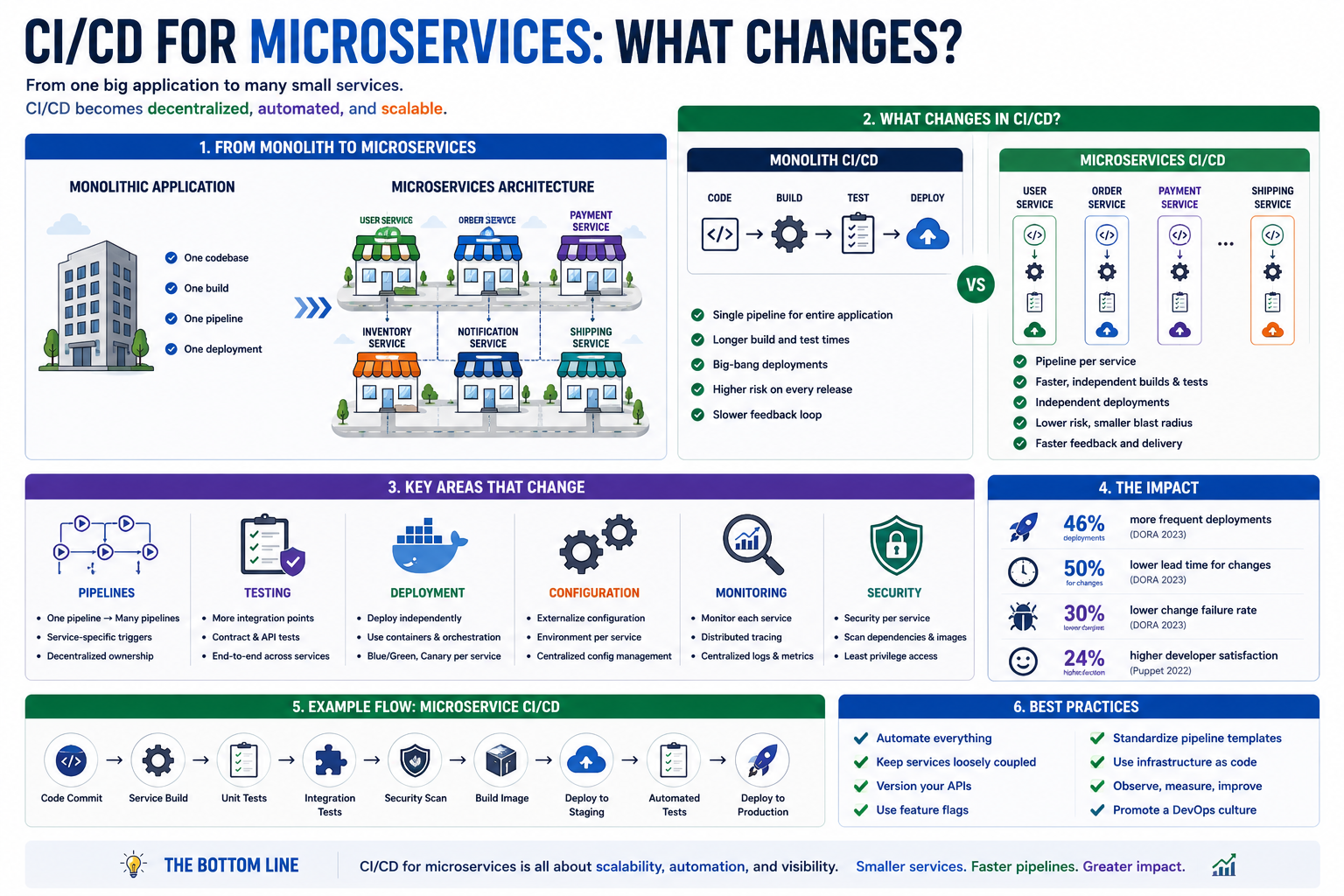
🚀 CI/CD for Microservices: What Changes?
Moving from a monolithic application to microservices?
You’ll quickly discover that your CI/CD pipeline needs to evolve too. Here’s a simple way to understand it:
🏙️Think of a monolithic application as one large shopping mall.
Now imagine replacing that mall with an entire city of independent shops.
Each shop operates independently but they all need roads, utilities, and deliveries to work together.
That’s exactly what changes when you adopt microservices.
🏢 1️⃣One Pipeline Becomes Many
With a monolith, one pipeline builds and deploys the entire application. With microservices… Each service gets its own pipeline.
✅ Independent builds
✅ Independent testing
✅ Independent deployments
This allows teams to move faster without affecting unrelated services.
🚚 2️⃣Small Deliveries Replace One Large Shipment
Imagine delivering supplies to one shopping mall, Easy. Now imagine delivering supplies to 100 individual stores across the city. Each delivery must arrive at the right place and at the right time. Microservices work the same way. Each service can be deployed independently whenever it’s ready.
⚡ 3️⃣Faster Releases Become Possible
If one store renovates its entrance… You don’t close the entire city. Likewise, updating one microservice shouldn’t require redeploying every application component. 🎯 Deploy only the service that changed. Result?
🚀 Faster releases
🚀 Lower deployment risk
🚀 Happier developers
🧪 4️⃣Testing Becomes More Complex
Testing a monolith is like inspecting one large building. Testing microservices is like inspecting every shop and making sure they all work together. Your CI/CD pipeline should automate:
✅ Unit Tests
✅ Integration Tests
✅ API Tests
✅ Contract Tests
✅ End-to-End Tests
Each layer adds confidence before deployment.
To be contd. »>Part 2
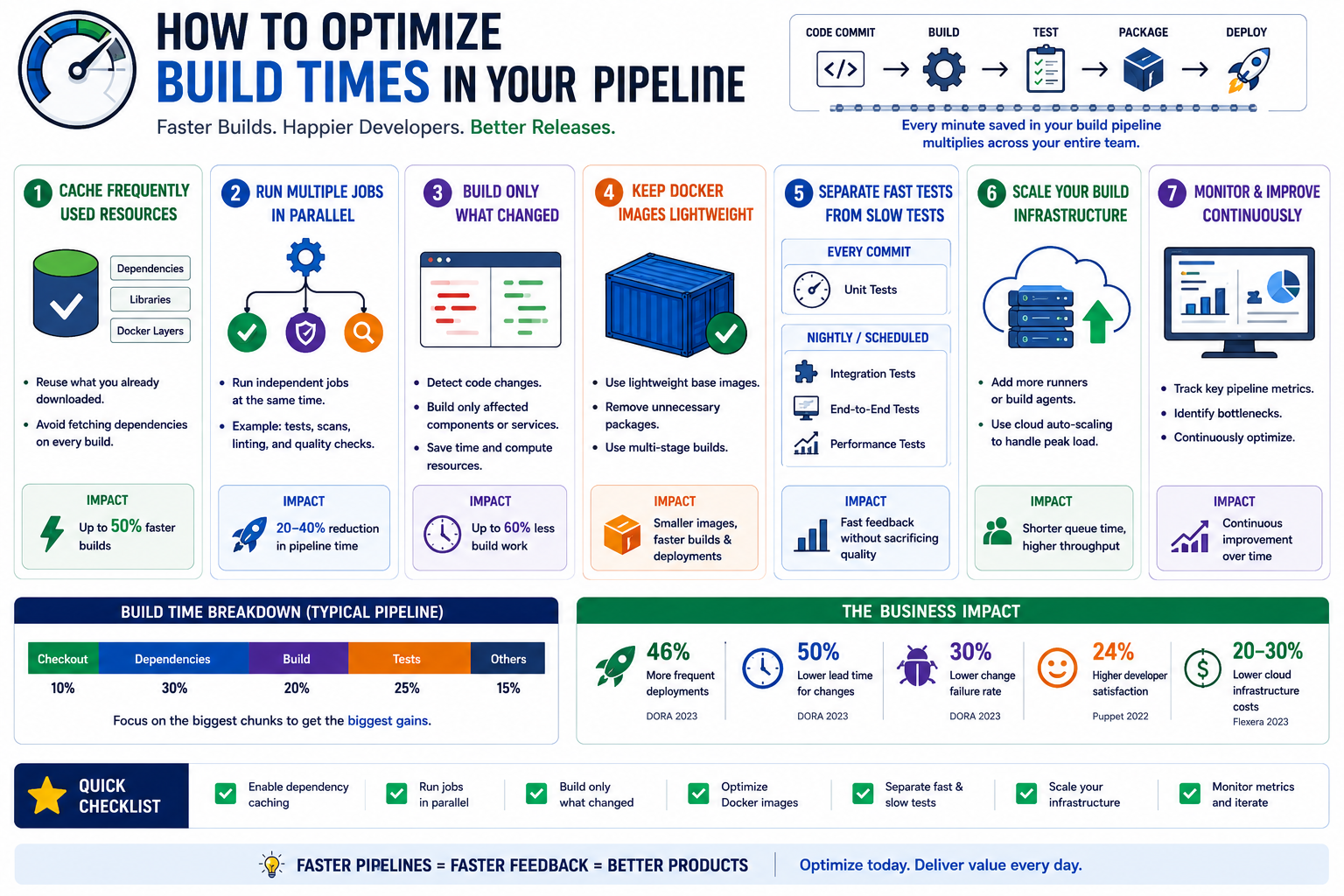
How to Optimize Build Times in Your Pipeline Part 2
🏗️ 6️⃣ Scale Your Build Infrastructure During holiday travel, airports open more security lanes. Your CI/CD pipeline should also scale when demand increases. Add: ✔️ More runners ✔️ More build agents ✔️ Cloud auto-scaling More capacity means fewer queues.
📊 7️⃣ Monitor Everything Airport managers constantly watch: ✈️ Flight delays 🛄 Baggage flow 🚪 Gate availability
DevOps teams should monitor: 📈 Build duration ⏱️ Queue time ❌ Pipeline failures 🚀 Deployment frequency 👉 You can’t improve what you don’t measure.
🌟 Why This Matters Optimizing build times leads to: ⚡ Faster developer feedback 🚀 More frequent deployments 😊 Happier developers 🐞 Faster bug fixes 📈 Shorter time-to-market 💰 Lower infrastructure costs
🎯 The Bottom Line A fast CI/CD pipeline isn’t about rushing software into production. It’s about eliminating unnecessary delays so developers can spend more time building value and less time waiting.
Just like a well-managed airport gets thousands of passengers to their destinations on time, a well-optimized CI/CD pipeline delivers software faster, more reliably, and with greater confidence.
Because in DevOps… 🚀 Every minute saved in your pipeline is another minute spent delivering value to your users.
💬 What’s the biggest bottleneck in your CI/CD pipeline today?
Share your experience in the comments!
How to Optimize Build Times in Your Pipeline Part 1
⏳ Is your CI/CD pipeline taking longer to build than it should? You’re not alone. Many development teams spend more time waiting for builds than writing code.
Here’s a simple way to understand how to optimize build times:
✈️ Think of your CI/CD pipeline like a busy airport preparing flights for takeoff. The goal isn’t just to get planes into the air—it’s to get them there quickly, safely, and efficiently.
🛫 1️⃣ Cache Frequently Used Resources
Imagine if every flight had to order new fuel trucks, baggage carts, and catering before boarding.
Delays would pile up fast.
CI/CD pipelines work the same way.
💡 Cache frequently used resources like:
✅ Dependencies
✅ Libraries
✅ Docker layers
Instead of downloading them every build, reuse what’s already available.
Result: ⚡ Faster builds and less waiting.
⚙️ 2️⃣ Run Multiple Jobs in Parallel
At an airport, fueling, baggage loading, and cabin cleaning happen at the same time.
They don’t wait for one another.
Your pipeline shouldn’t either.
Run independent jobs simultaneously:
✔️ Unit Tests
✔️ Security Scans
✔️ Code Quality Checks
🎯 Parallel execution can significantly reduce overall build time.
🎯 3️⃣ Build Only What Changed
If one passenger changes their boarding pass, the airport doesn’t restart check-in for everyone.
Likewise…
Don’t rebuild your entire application if only one microservice changed.
🚀 Build only the affected components.
Less work = Faster pipelines.
📦 4️⃣ Keep Docker Images Lightweight
Large airplanes require more fuel and preparation.
Large Docker images do too.
Optimize them by:
✅ Using lightweight base images
✅ Removing unnecessary packages
✅ Using multi-stage builds
Smaller images move through your pipeline much faster.
🧪 5️⃣ Separate Fast Tests from Slow Tests
Every traveler goes through standard security.
Only a few require additional screening.
Your testing strategy should work the same way.
Every Code Commit
✅ Unit Tests
Scheduled or Nightly Pipelines
✅ Integration Tests
✅ End-to-End Tests
✅ Performance Tests
⚡ Developers get faster feedback without sacrificing quality.
To be contd. »>Part2
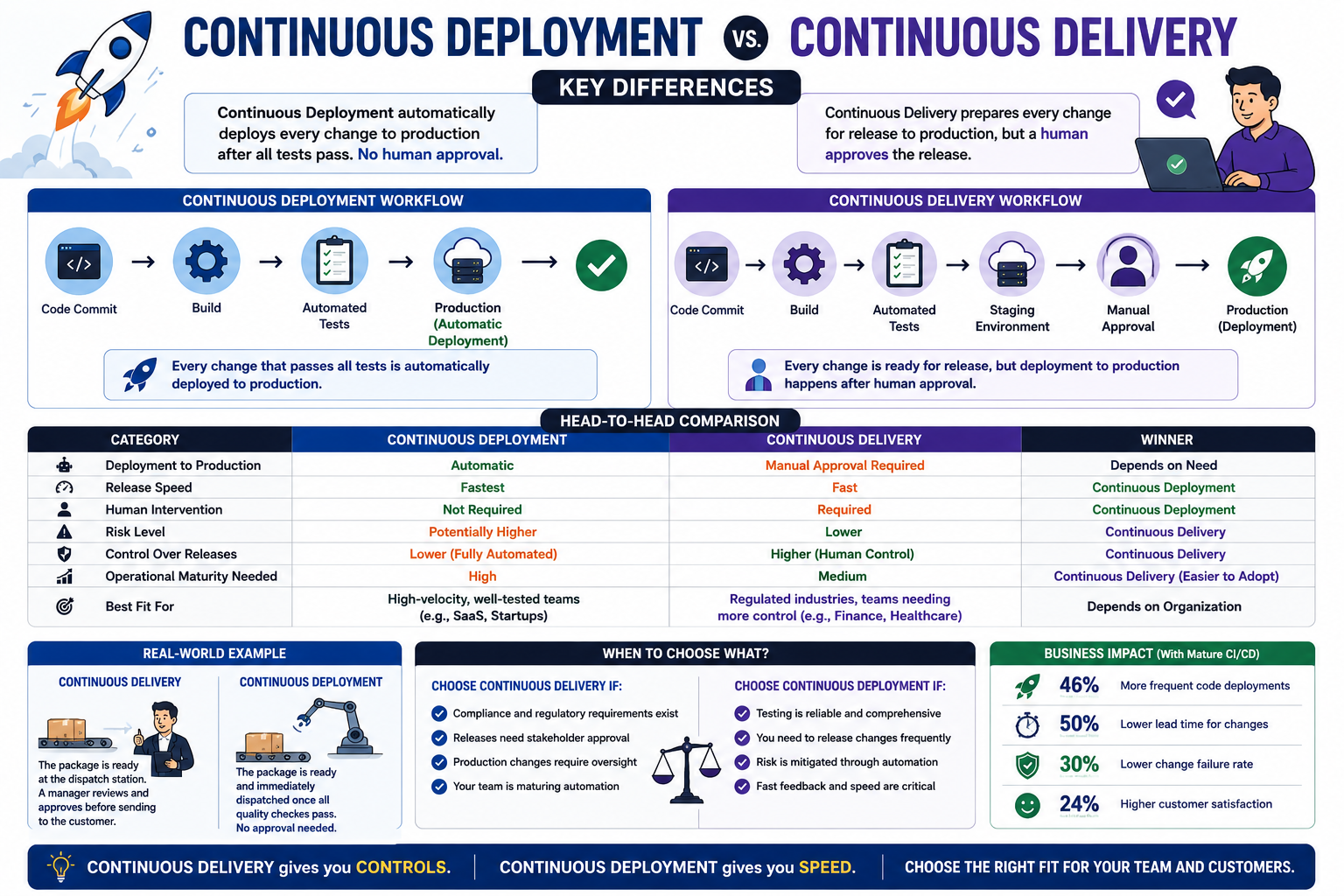
Continuous Deployment vs. Continuous Delivery: Key Differences
Many people use Continuous Deployment and Continuous Delivery interchangeably.
But while they are closely related, they are not the same thing.
Let’s break it down using a data-driven comparison.
The Shared Goal
Both Continuous Delivery and Continuous Deployment aim to: ✔ Automate software delivery ✔ Reduce manual work ✔ Increase release frequency ✔ Improve software quality
The difference lies in what happens after the application passes all tests.
Continuous Delivery
What It Means With Continuous Delivery, every code change is automatically: ✔ Built ✔ Tested ✔ Validated ✔ Prepared for release
However: A human still decides when to deploy to production.
Workflow
Code Commit ↓ Build ↓ Automated Tests ↓ Staging Environment ↓ Manual Approval ↓ Production
Key Advantage
Provides greater control over production releases.
Useful for:
Financial services Healthcare systems Highly regulated industries Continuous Deployment What It Means
With Continuous Deployment, every change that passes all tests is:
✔ Automatically deployed to production
No manual approval is required.
Workflow
Code Commit ↓ Build ↓ Automated Tests ↓ Production
Key Advantage
Delivers features to users as quickly as possible.
Common among:
SaaS companies Cloud-native startups High-velocity engineering teams
Real-World Example
Imagine an online food delivery company.
Continuous Delivery
The meal is prepared, packaged, and ready at the dispatch station.
A manager reviews it before sending it to the customer.
Continuous Deployment
The meal is prepared, packaged, and immediately dispatched once quality checks pass.
No manager approval is needed.
When to Choose Continuous Delivery
Choose Continuous Delivery if:
✔ Compliance requirements exist ✔ Business stakeholders approve releases ✔ Production changes require oversight ✔ Teams are still maturing their automation processes
When to Choose Continuous Deployment
Choose Continuous Deployment if:
✔ Testing is highly reliable ✔ Releases happen frequently ✔ Risk is well controlled through automation ✔ Fast customer feedback is a priority
The Business Impact Organizations with mature deployment automation often achieve:
✔ Faster release cycles ✔ Reduced lead time for changes ✔ More frequent deployments ✔ Improved customer responsiveness
The key is choosing the model that matches your organization’s risk tolerance and operational maturity.
The Bottom Line
Continuous Delivery means software is always ready to deploy.
Continuous Deployment means software is automatically deployed when it’s ready.
Think of it this way:
Continuous Delivery asks, “Should we release now?”
Continuous Deployment says, “The tests passed—let’s release now.”
Both improve software delivery.
The right choice depends on how much control versus speed your organization needs. 🚀
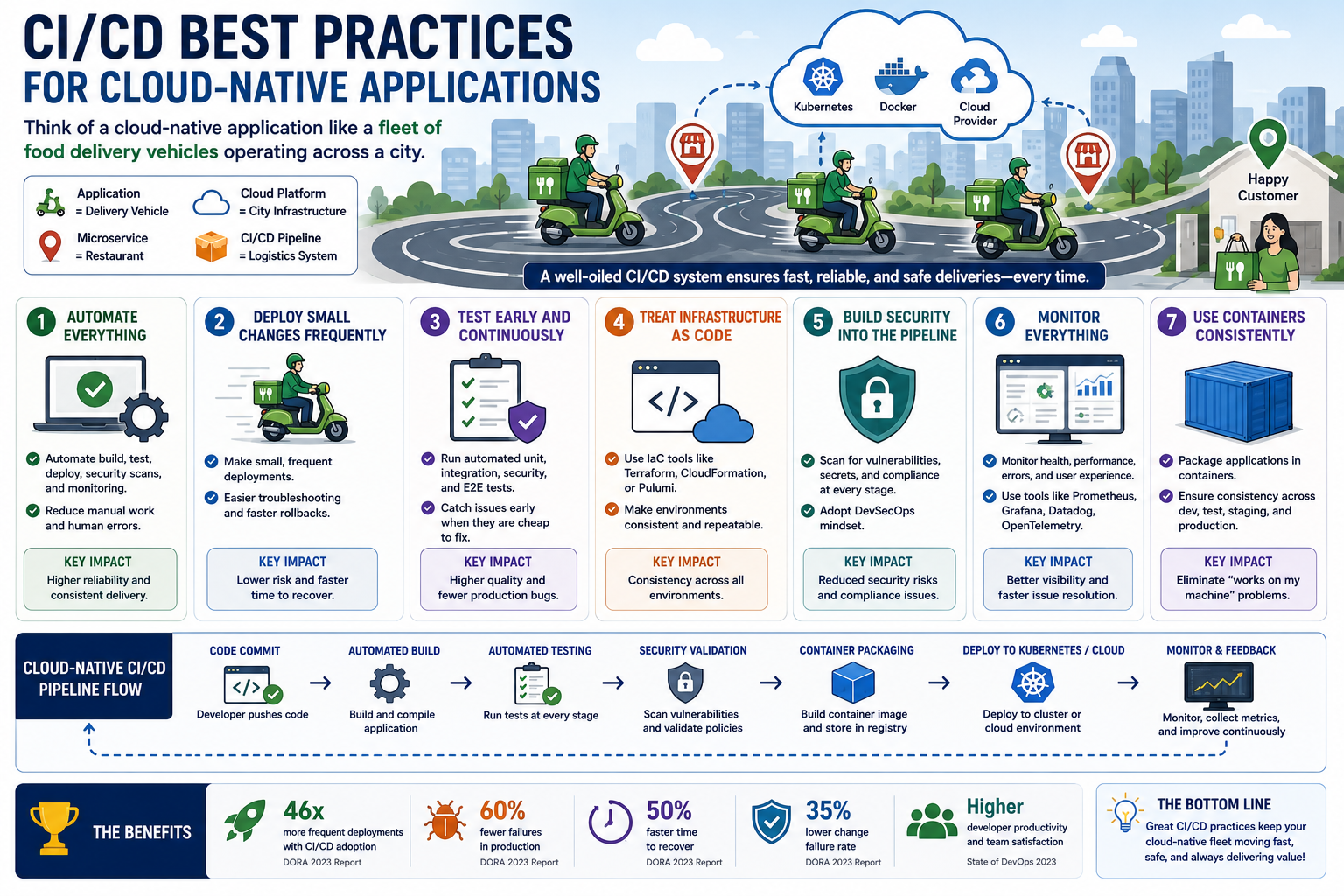
CI/CD Best Practices for Cloud-Native Applications
Cloud-native applications are designed for speed, scalability, and resilience.
But without the right CI/CD practices, even the most modern applications can become difficult to manage.
Here’s a simple way to understand it:
Think of a cloud-native application like a fleet of food delivery vehicles operating across an entire city.
To keep deliveries fast and reliable, you need more than drivers—you need a well-designed system.
1️⃣ Automate Everything Possible
Imagine asking drivers to manually plan every route, calculate every delivery, and update every customer.
Chaos would follow.
In cloud-native environments, automate:
✔ Builds ✔ Testing ✔ Deployments ✔ Security scans ✔ Monitoring
The less manual work involved, the more reliable the process becomes.
2️⃣ Deploy Small Changes Frequently
Large deliveries are harder to manage.
If something goes wrong, finding the problem takes longer.
Cloud-native teams perform smaller, more frequent deployments.
Benefits include:
✔ Easier troubleshooting ✔ Faster rollbacks ✔ Lower deployment risk
3️⃣ Test Early and Continuously
Would you wait until the end of the day to check whether delivery vehicles are working?
Probably not.
Cloud-native CI/CD pipelines automatically run:
✔ Unit tests ✔ Integration tests ✔ Security tests ✔ End-to-end tests
The earlier problems are detected, the cheaper they are to fix.
4️⃣ Treat Infrastructure as Code
Imagine rebuilding delivery routes manually every day.
Infrastructure as Code (IaC) allows teams to define environments using code.
Popular tools include:
✔ Terraform ✔ CloudFormation ✔ Pulumi
This improves consistency and repeatability.
5️⃣ Build Security into the Pipeline
Security should not be an afterthought.
Modern pipelines integrate:
✔ Dependency scanning ✔ Container image scanning ✔ Secret detection ✔ Compliance checks
This approach is often called DevSecOps.
6️⃣ Monitor Everything
Once deliveries begin, visibility matters.
Cloud-native teams continuously monitor:
✔ Application health ✔ Performance metrics ✔ Error rates ✔ User experience
Tools often include:
✔ Prometheus ✔ Grafana ✔ Datadog ✔ OpenTelemetry
7️⃣ Use Containers Consistently
Every delivery vehicle should operate the same way.
Containers help ensure applications behave consistently across:
✔ Development ✔ Testing ✔ Staging ✔ Production
This reduces the classic “works on my machine” problem.
Why These Practices Matter
Organizations that adopt mature CI/CD practices often achieve:
✔ Faster release cycles ✔ Higher deployment success rates ✔ Reduced downtime ✔ Better scalability ✔ Improved customer experience
Cloud-Native CI/CD Flow
Developer Pushes Code ↓ Automated Build ↓ Automated Testing ↓ Security Validation ↓ Container Packaging ↓ Deployment to Kubernetes/Cloud ↓ Monitoring & Feedback
The Bottom Line
Cloud-native applications are built to move fast.
CI/CD best practices ensure they can move fast without sacrificing quality, reliability, or security.
Because in cloud-native development, success isn’t just about deploying more often.
It’s about deploying safely, consistently, and confidently. 🚀
🔐 How to Secure Your CI/CD Pipeline Part 2
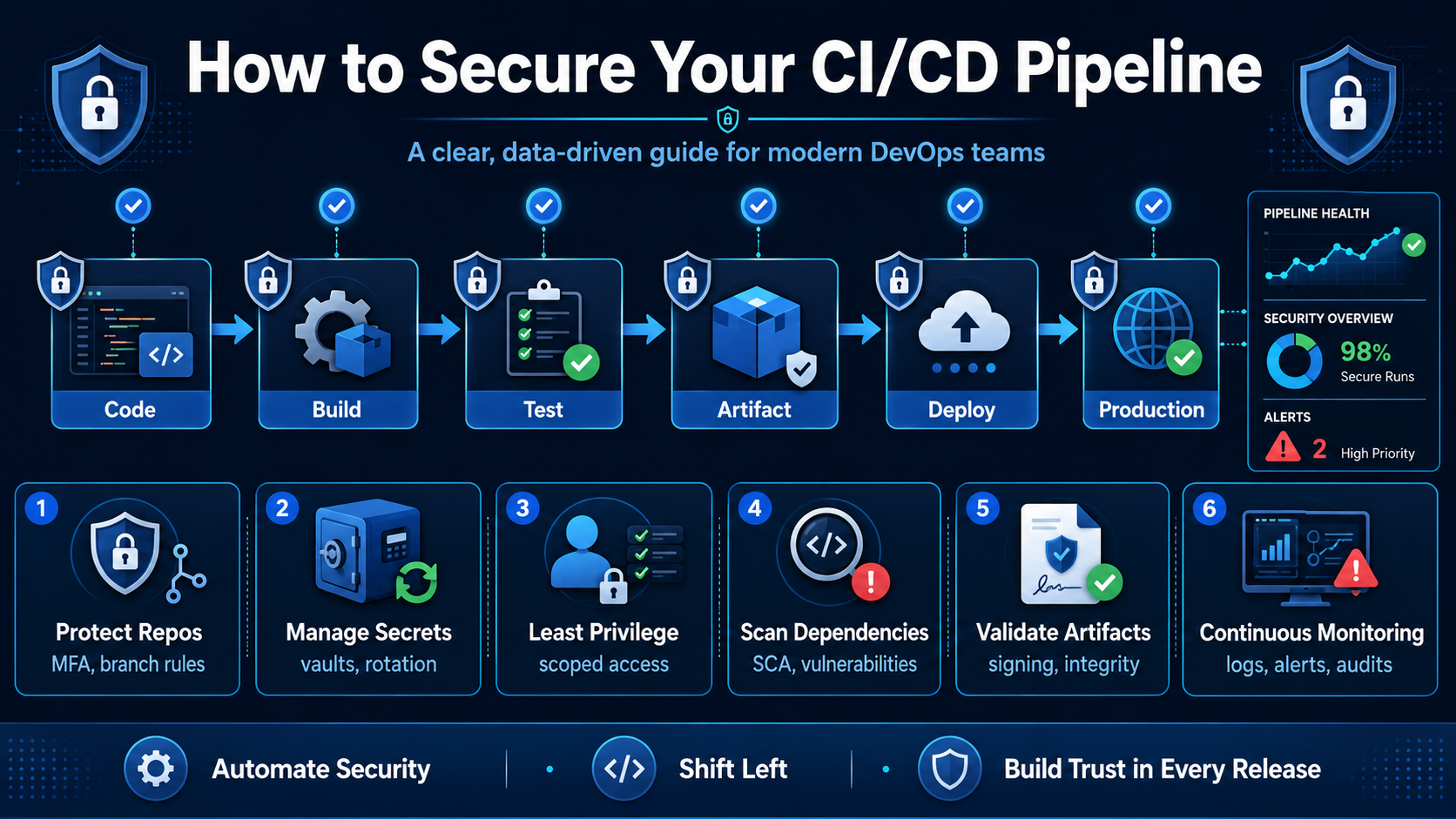
- Validate Build Artifacts ✅
A secure CI/CD pipeline should prove that the artifact being deployed is the same artifact that was built, tested, and approved.
This is where artifact signing, checksums, provenance, and controlled registries become important.
Without artifact integrity validation, attackers may tamper with build outputs or replace approved artifacts with malicious ones.
The pipeline should answer three questions:
Who built this artifact? What source code was used? Has it been changed since it was built?
- Secure the Build Environment 🏗️
Build environments are often overlooked.
A compromised build runner can steal secrets, alter build outputs, or inject malicious code. This is especially risky when runners are shared, persistent, or poorly isolated.
Use clean build environments. Patch runners regularly. Avoid running untrusted code with privileged access. Separate production deployment jobs from general build jobs. Monitor runner activity.
Your build system should be treated as sensitive infrastructure, not just a background automation tool.
- Add Security Testing Into the Pipeline 🧪
Security should not wait until the final stage of release.
Add automated checks directly into the CI/CD workflow:
Static application security testing for source code issues. Dependency scanning for vulnerable packages. Container image scanning for insecure base images. Infrastructure-as-code scanning for cloud misconfigurations. Secret scanning to detect accidental leaks.
This approach helps teams find issues earlier, when they are cheaper and easier to fix.
- Monitor the Pipeline Continuously 📊
CI/CD security does not end after setup.
You need continuous monitoring.
Track failed login attempts. Watch for unusual pipeline changes. Review permission changes. Monitor deployment activity. Alert on unexpected secret access. Audit who changed workflows and when.
A secure pipeline is not only protected. It is observable.
Final Thought 💡
CI/CD security is not about slowing developers down.
It is about building a safer path from code to production.
A strong pipeline should help teams move fast without losing control. It should protect source code, secrets, dependencies, artifacts, build systems, and deployment environments.
The best CI/CD pipelines do three things well:
They automate delivery. 🚀 They enforce security. 🔒 They create trust in every release. 🤝
In today’s software environment, securing the CI/CD pipeline is no longer optional.
It is part of building reliable, production-ready software. ✅
🔐 How to Secure Your CI/CD Pipeline
CI/CD pipelines help teams ship software faster 🚀, but speed without security can create serious risk.
A CI/CD pipeline is no longer just a developer tool. It is now part of the software supply chain. It connects source code, build systems, secrets, cloud environments, containers, third-party packages, and production deployments.
That means one weak point in the pipeline can become a direct path into production.
According to OWASP, CI/CD security risks include issues such as insufficient pipeline authorization, poisoned pipeline execution, insecure system configuration, improper artifact integrity validation, and poor secrets management. In simple terms, attackers are not only targeting applications anymore. They are targeting the process used to build and deploy them.
Why CI/CD Security Matters
Modern engineering teams are under pressure to release quickly.
But the faster the release cycle, the more important pipeline security becomes.
A small misconfiguration can expose secrets. 🔑 An unverified dependency can introduce malicious code. ⚠️ An over-permissioned build agent can become a privilege escalation point. A compromised deployment workflow can push unsafe code into production.
This is why CI/CD security should not be treated as an afterthought. It should be built into the pipeline from the beginning.
- Protect Your Source Code Repository 🛡️
Your repository is the starting point of the pipeline.
If attackers gain access to your codebase, they may modify application code, pipeline files, infrastructure scripts, or secrets. That is why access control is one of the first layers of CI/CD security.
Use multi-factor authentication. Apply branch protection rules. Require pull request reviews. Limit who can modify pipeline configuration files. Monitor unusual commits or changes to build workflows.
A secure pipeline begins with a secure repository.
- Manage Secrets Properly 🔑
One of the most common CI/CD mistakes is exposing secrets inside code, logs, build scripts, or environment variables.
Secrets include API keys, cloud credentials, database passwords, private tokens, and certificates.
Instead of hardcoding secrets, use a dedicated secrets manager. Rotate credentials regularly. Mask sensitive values in logs. Avoid giving long-lived credentials to pipeline jobs.
A good rule is simple: your pipeline should have access only to the secrets it needs, only when it needs them.
- Apply Least Privilege Access 👤
CI/CD tools often need access to cloud services, container registries, deployment environments, and infrastructure platforms.
But giving the pipeline too much permission is dangerous.
If a build job only needs read access, do not give it admin access. If a deployment job only targets staging, do not allow it to deploy to production. If a temporary token can be used, avoid permanent credentials.
Least privilege reduces the damage if a pipeline component is compromised.
- Scan Dependencies Before They Reach Production 🔍
Most modern applications depend heavily on open-source packages.
That makes dependency scanning critical.
Use software composition analysis to detect vulnerable packages. Generate a software bill of materials where possible. Pin dependency versions instead of blindly pulling the latest release. Review high-risk packages before introducing them into production systems.
The goal is not to avoid open source. The goal is to use it with visibility and control.
To be contd. »>Part2
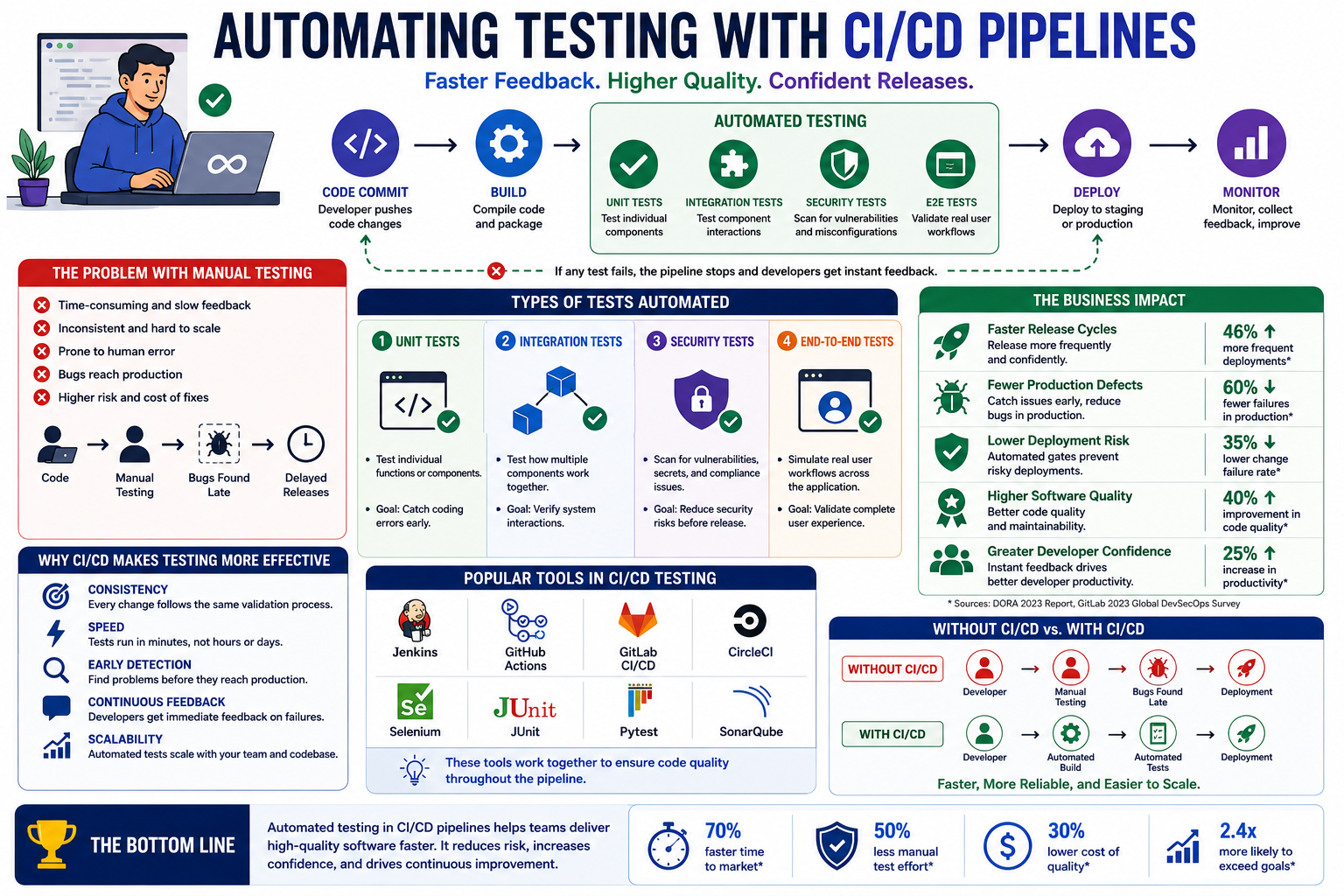
What Automated Testing in CI/CD Looks Like
What Automated Testing in CI/CD Looks Like
With CI/CD, testing becomes part of the delivery process.
Every code change automatically triggers tests before deployment.
Typical pipeline:
Code Commit
↓
Build
↓
Automated Tests
↓
Deploy
If tests fail, deployment stops automatically.
Types of Tests Commonly Automated
1️⃣ Unit Tests
Tests individual functions or components.
Goal: Catch coding errors early.
2️⃣ Integration Tests
Tests how multiple components work together.
Goal: Verify system interactions.
3️⃣ Security Tests
Scans for vulnerabilities and misconfigurations.
Goal: Reduce security risks before release.
4️⃣ End-to-End Tests
Simulates real user workflows.
Goal: Validate the complete application experience.
The Business Impact
Organizations that automate testing often experience:
✔ Faster release cycles
✔ Fewer production defects
✔ Lower deployment risk
✔ Higher software quality
✔ Greater developer confidence
Why CI/CD Makes Testing More Effective
Automated testing delivers:
Consistency
Every change follows the same validation process.
Speed
Tests run in minutes instead of hours or days.
Early Detection
Problems are identified before reaching production.
Continuous Feedback
Developers receive immediate information about failures.
Common Tools Used
Many teams automate testing using:
✔ Jenkins
✔ GitHub Actions
✔ GitLab CI/CD
✔ CircleCI
✔ Selenium
✔ JUnit
✔ PyTest
✔ SonarQube
Each tool plays a role in ensuring code quality throughout the pipeline.
A Simple Example
Without CI/CD:
Developer → Manual Testing → Deployment
With CI/CD:
Developer → Automated Build → Automated Tests → Deployment
The second process is faster, more reliable, and easier to scale.
The Bottom Line
Automated testing isn’t just about finding bugs.
It’s about building confidence in every release.
By integrating testing into CI/CD pipelines, teams can deliver software more frequently while maintaining quality and reliability.
In modern software development:
The faster you release, the more important automated testing becomes. 🚀
How to Implement CI/CD with GitLab
Want to implement CI/CD with GitLab but not sure where to start?
You are not alone.
Many engineers know what CI/CD is but struggle with how to put it into practice.
Let’s break it down using a data-driven approach.
How to Implement CI/CD with GitLab
1️⃣ Start with Your Repository
Everything begins with your code repository.
GitLab combines:
✔ Source code management
✔ CI/CD automation
✔ Security features
✔ Deployment workflows
Data Insight:
Instead of stitching together multiple tools, GitLab provides an integrated DevOps platform.
2️⃣ Create a .gitlab-ci.yml File
The CI/CD pipeline in GitLab is driven by a configuration file.
This file defines:
Build stages
Testing stages
Deployment steps
Pipeline rules
Example workflow:
Code Push → Build → Test → Deploy
Data Insight:
Keeping pipeline configuration as code improves consistency and version control.
3️⃣ Define Pipeline Stages
Most teams begin with simple stages:
Build
Compile code
Install dependencies
Test
Run unit tests
Run integration tests
Deploy
Push application to staging or production
Data Insight:
Breaking pipelines into stages reduces deployment failures and improves troubleshooting.
4️⃣ Configure GitLab Runners
GitLab Runners execute pipeline jobs.
Runners can be:
✔ Shared runners
✔ Self-hosted runners
✔ Cloud-based runners
Data Insight:
Self-hosted runners provide greater control, while shared runners reduce setup effort.
5️⃣ Add Automation Rules
Automation can include:
✔ Trigger pipelines on code push
✔ Run tests automatically
✔ Deploy only after approvals
✔ Schedule recurring jobs
Data Insight:
Automated workflows reduce manual intervention and improve release consistency.
Benefits of Implementing CI/CD with GitLab
✔ Faster release cycles
✔ Earlier bug detection
✔ Reduced human error
✔ Better collaboration
✔ Consistent deployments
✔ Greater development visibility
Basic GitLab Pipeline Flow
Developer Pushes Code ↓ GitLab Pipeline Starts ↓ Build Application ↓ Run Tests ↓ Deploy to Environment ↓ Monitor Results
The Bottom Line
Implementing CI/CD with GitLab is not about creating complicated pipelines.
It starts with building a repeatable process that moves code safely from development to production.
Because in modern software delivery:
Consistency + Automation + Feedback = Faster and more reliable releases.
What was the biggest challenge when you built your first GitLab pipeline? 👇
GitHub Actions vs. Jenkins: Which CI/CD Tool Actually Wins? Part2
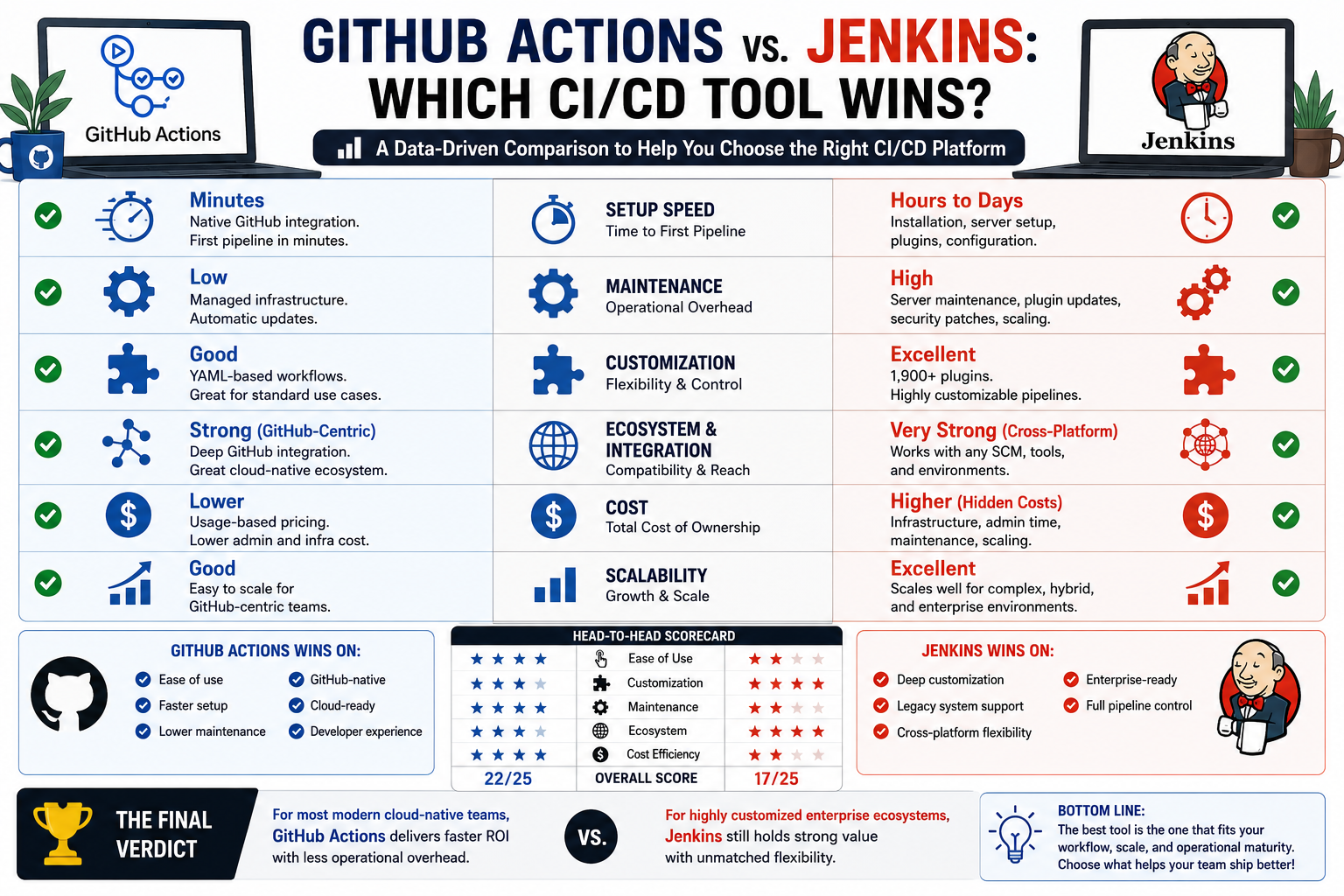
5️⃣ Cost Considerations
GitHub Actions:
✔ Lower infrastructure cost
✔ Usage-based pricing
✔ Lower admin burden
Jenkins:
✔ Open-source core
✔ Potentially higher hidden costs (hosting, maintenance, admin time)
Real-World Insight:
“Free” software can still be expensive when operational complexity is high.
Performance Summary
GitHub Actions Wins On:
✔ Ease of use
✔ Faster deployment setup
✔ Lower maintenance
✔ GitHub-native workflows
Jenkins Wins On:
✔ Advanced customization
✔ Enterprise flexibility
✔ Legacy compatibility
✔ Complex deployment architectures
***** The Strategic Decision
Choose GitHub Actions if:
Your code is already on GitHub
You want fast implementation
You value simplicity and speed
You have a lean DevOps team
Choose Jenkins if:
You need deep customization
You support multiple SCM platforms
You manage legacy infrastructure
You have resources for maintenance
Final Verdict
For most modern cloud-native teams: GitHub Actions often delivers faster ROI.
For highly customized enterprise ecosystems: Jenkins still holds strong value.
Bottom Line
The real winner isn’t the tool with the most features it’s the one that best aligns with your team’s workflow, scale, and operational maturity.
In DevOps, efficiency is not about using the biggest tool.
It’s about using the right one.
Which has delivered better results for your team GitHub Actions or Jenkins?
Share your experience below 👇
GitHub Actions vs. Jenkins: Which CI/CD Tool Actually Wins?
Choosing the right CI/CD platform can significantly impact deployment speed, maintenance overhead, scalability, and engineering productivity.
Rather than relying on hype, let’s break it down using a data-driven comparison.
GitHub Actions vs. Jenkins By the Numbers
1️⃣ Setup Speed & Time to First Pipeline
GitHub Actions:
✔ Native GitHub integration
✔ Minimal setup
✔ First pipeline often configured in minutes
Jenkins:
✔ Requires installation, server setup, plugins, and maintenance
✔ Initial setup can take hours to days depending on complexity
Data Insight:
For GitHub-centric teams, GitHub Actions often reduces onboarding time dramatically.
2️⃣ Maintenance Overhead
GitHub Actions:
✔ Managed infrastructure
✔ No server maintenance
✔ Automatic updates
Jenkins:
✔ Self-hosted or managed by your team
✔ Plugin updates, security patches, scaling responsibility
Data Insight:
Jenkins often introduces higher operational overhead, especially for smaller teams.
3️⃣ Customization & Flexibility
GitHub Actions:
✔ Excellent for standard workflows
✔ YAML-based automation
✔ Marketplace integrations
Jenkins:
✔ Extensive plugin ecosystem (1,900+ plugins)
✔ Highly customizable pipelines
✔ Supports complex hybrid infrastructures
Data Insight:
Jenkins remains stronger for organizations with legacy systems or highly specialized workflows.
4️⃣ Ecosystem & Integration
GitHub Actions:
✔ Best for GitHub repositories
✔ Strong cloud-native integrations
✔ Excellent developer experience
Jenkins:
✔ Broader cross-platform flexibility
✔ Works well beyond GitHub
✔ Often favored in mixed enterprise environments
…Which is the winner, Github Actions or Jenkins?
To be contd. »>Part2
Top 10 CI/CD Tools Every Engineer Should Know
Feeling overwhelmed by all the CI/CD tools out there?
You’re not alone.
Many engineers ask the same question. Here’s a simple way to understand them:
Think of CI/CD tools like the essential equipment in a high-performance restaurant kitchen. Each tool has a different role but together, they help deliver quality fast.
1️⃣ GitHub Actions —> The Built-In Prep Station
Like having prep space inside your kitchen.
It automates workflows directly where your code lives.
2️⃣ Jenkins —> The Custom Master Kitchen
Powerful, flexible, and highly customizable.
Jenkins is like building your own kitchen exactly how you want it.
3️⃣ GitLab CI/CD —> The All-in-One Kitchen
Storage, prep, cooking, and serving—all in one place.
Ideal for teams that want one integrated platform.
4️⃣ CircleCI —> The Speed Chef
Fast, cloud-first, and optimized for rapid delivery.
Built for teams focused on speed and automation.
5️⃣ Azure DevOps —> The Enterprise Kitchen
Structured, organized, and built for larger operations.
Great for businesses managing complex workflows.
6️⃣ Docker —> The Packaging Station
Before food goes out, it’s packaged properly.
Docker packages applications consistently across environments.
7️⃣ Kubernetes —> The Kitchen Manager
Coordinates where everything runs.
Kubernetes ensures containers are deployed, scaled, and managed efficiently.
8️⃣ Terraform —> The Restaurant Builder
Before cooking starts, you need the building.
Terraform automates infrastructure creation.
9️⃣ Ansible —> The Operations Supervisor
Keeps systems configured consistently.
Ansible automates setup and operational tasks.
🔟 Prometheus + Grafana —> The Quality Control Dashboard
You can’t improve what you can’t measure.
These tools monitor system health and performance.
Why These Tools Matter
Without the right kitchen equipment, service becomes slow and inconsistent.
With the right CI/CD stack, teams gain:
✔ Faster deployments
✔ Better reliability
✔ Automation at scale
✔ Improved visibility
✔ Reduced manual errors
CI/CD tools are not just software—they’re the operational backbone of modern engineering. You don’t need every tool.
You need the right combination for your workflow.
Because great software delivery is like a great kitchen the right tools make speed, quality, and consistency possible.
Which CI/CD tool has made the biggest impact on your workflow?
Share below 👇
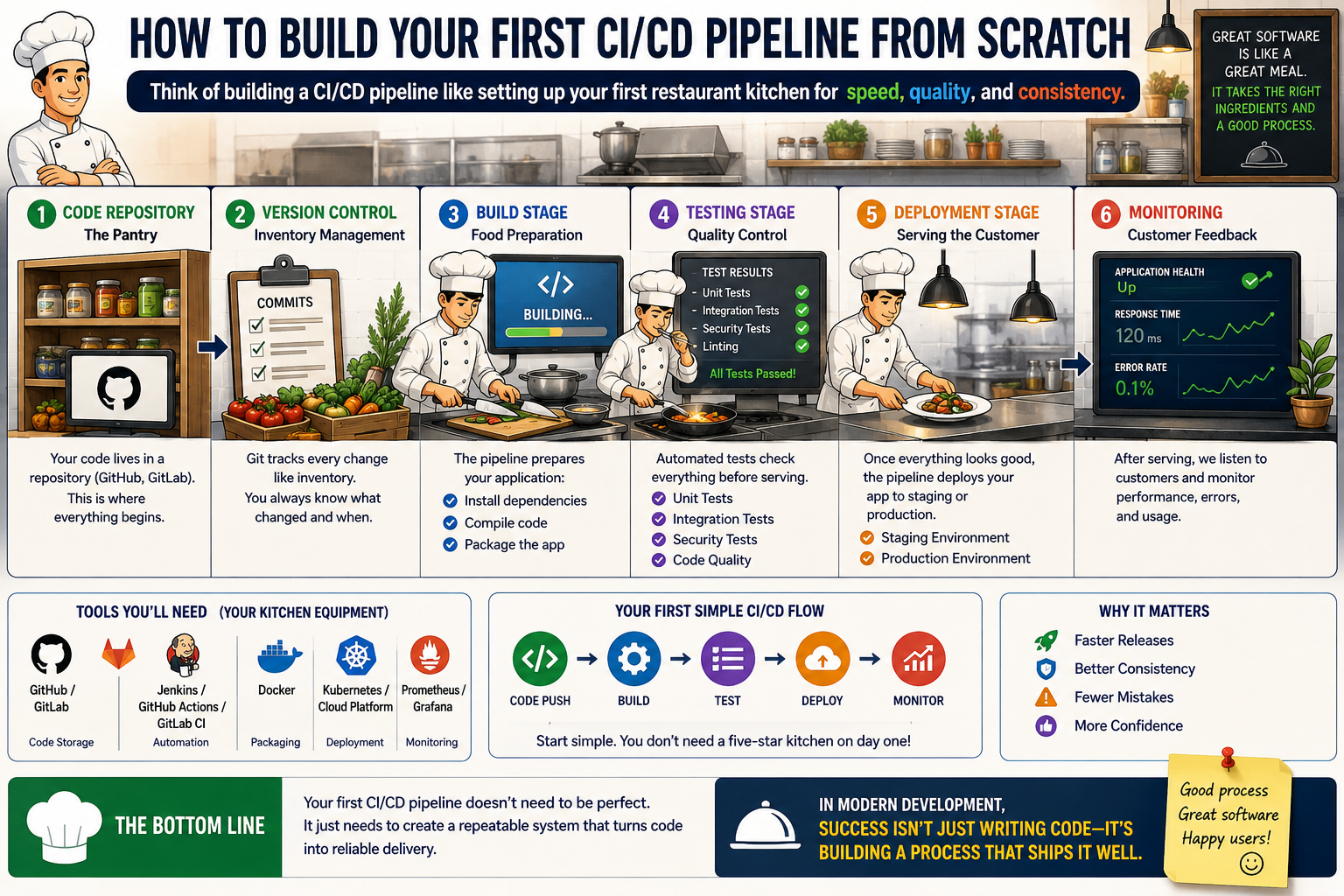
How to Build Your First CI/CD Pipeline from Scratch
Want to build your first CI/CD pipeline but not sure where to start?
Here’s a simple way to understand it:
Think of building a CI/CD pipeline like setting up your first restaurant kitchen for speed, quality, and consistency.
1️⃣ Your Code Repository Is the Pantry
Every kitchen starts with ingredients.
In CI/CD, your code lives in a repository like GitHub or GitLab.
This is where everything begins.
2️⃣ Version Control Is Inventory Management
A good kitchen tracks every ingredient change.
Git tracks every code update, so nothing gets lost and every change is organized.
3️⃣ Build Stage Is Food Preparation
Before serving customers, ingredients must be prepared correctly.
Your pipeline builds the application, installs dependencies, and ensures everything is ready.
4️⃣ Testing Stage Is Quality Control
No good restaurant serves food without checking quality.
Your pipeline runs automated tests to catch bugs before they reach users.
5️⃣ Deployment Stage Is Serving the Customer
Once the dish passes inspection, it’s ready to be served.
Your pipeline deploys code to staging or production automatically.
6️⃣ Monitoring Is Customer Feedback
Even after the meal is served, great restaurants pay attention to customer experience.
CI/CD pipelines monitor application health, errors, and performance.
Basic Tools You’ll Need (Your Kitchen Equipment)
✔ GitHub / GitLab —> Code storage
✔ GitHub Actions / Jenkins / GitLab CI —> Automation
✔ Docker —> Packaging
✔ Kubernetes / Cloud Platform —> Deployment
✔ Monitoring Tools —> Performance tracking
Your First Simple Flow Code Push → Build → Test → Deploy → Monitor
Start simple, You don’t need a five-star kitchen on day one.
Why This Matters
Without CI/CD, every deployment feels manual and stressful.
With CI/CD, you create:
✔ Faster releases
✔ Better consistency
✔ Fewer mistakes
✔ More confidence
Your first CI/CD pipeline doesn’t need to be perfect.
It just needs to create a repeatable system that turns code into reliable delivery.
Because in modern development,
success isn’t just writing code—it’s building a process that ships it well.
What tool did you use to build your first CI/CD pipeline?
Share below 👇
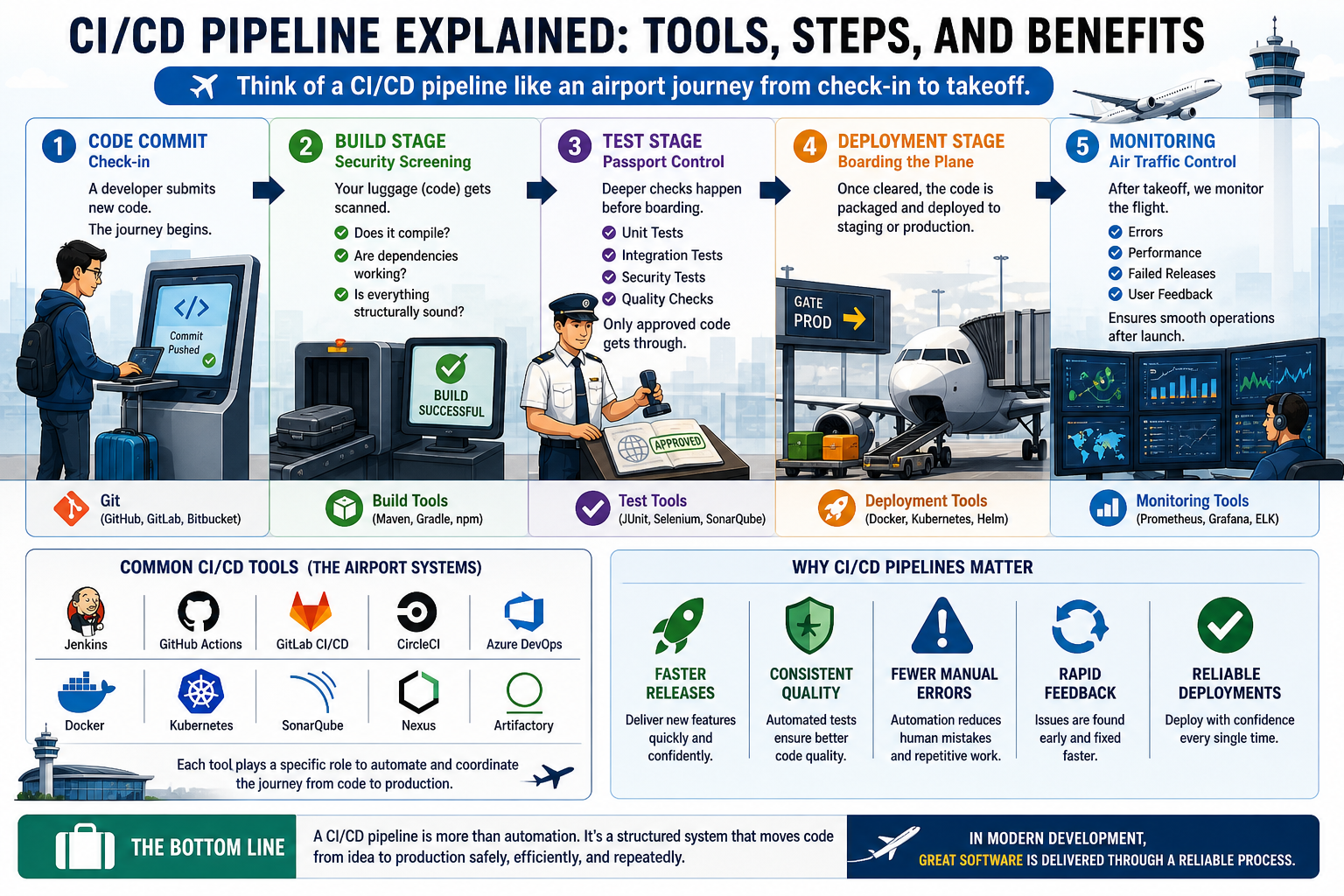
CI/CD Pipeline Explained: Tools, Steps, and Benefits
Trying to understand what a CI/CD pipeline actually does?
Here’s a simple way to break it down:
Think of a CI/CD pipeline like an airport journey from check-in to takeoff.
1️⃣ Code Commit Is Check-In
A developer submits new code just like a traveler checking in at the airport.
This is where the journey begins.
2️⃣ Build Stage Is Security Screening
Your luggage (code) gets scanned.
The system checks:
Does it compile?
Are dependencies working?
Is everything structurally sound?
If something fails here, it doesn’t move forward.
3️⃣ Test Stage Is Passport Control
Before boarding, deeper checks happen.
Automated tests verify:
✔ Functionality
✔ Integration
✔ Stability
Only approved code gets through.
4️⃣ Deployment Stage Is Boarding the Plane
Once cleared, the code is packaged and deployed to staging or production.
This is where software officially “takes off.”
5️⃣ Monitoring Is Air Traffic Control
Even after takeoff, flights are monitored.
CI/CD pipelines track deployments for:
Errors
Performance issues
Failed releases
This ensures smooth operations after launch.
Common CI/CD Tools (The Airport Systems)
Just like airports rely on specialized systems, CI/CD uses tools such as:
✔ GitHub Actions
✔ Jenkins
✔ GitLab CI/CD
✔ CircleCI
✔ Docker
✔ Kubernetes
Each tool helps automate and coordinate the journey.
Why CI/CD Pipelines Matter
Without a pipeline, software delivery can feel like unmanaged travel chaos.
With one, teams gain:
✔ Faster releases
✔ Consistent quality
✔ Fewer manual errors
✔ Rapid feedback
✔ Reliable deployments
A CI/CD pipeline is more than automation.
It’s a structured system that moves code from idea to production safely, efficiently, and repeatedly.
Because in modern development, great software isn’t just built, it’s delivered through a reliable process.
How do you explain CI/CD pipelines to beginners?
Share your analogy below 👇